
Yes—Pacdora offers a free plan, and it is a legitimate packaging-design platform operated by PACDORA PTE. LTD. The free plan is useful for testing Pacdora’s dielines, 3D mockups, templates, and AI tools, but export options and usage rights are limited. Pacdora’s current pricing page lists commercial-use permission under its Business plan, while the listed Lite and Pro plans specify personal use. Plan features, AI credits, export formats, and asset-specific license terms can change, so check the current terms for your exact plan before using any design in products you sell.
In our Pacdora review, we found it especially useful for small product-based businesses that need packaging dielines and realistic 3D mockups without building everything from scratch. However, it isn’t a complete replacement for Adobe Illustrator, particularly if you need advanced vector editing or highly customized print-production files.
So, is Pacdora worth it? For many small businesses, packaging designers, and beginners, yes—especially if speed, ready-made packaging templates, dielines, and 3D visualization are priorities.
In this Pacdora review, we’ll examine its key features, pricing, AI tools, packaging templates, dieline generator, and 3D mockup capabilities. We’ll also look at its pros and cons, who it’s best for, and how it compares with Adobe Illustrator.
If you’re still comparing different packaging design tools, you may also enjoy our roundup of the Best Packaging Software for Small Business, where we compare the leading solutions for different business needs.
Table of Contents
- What Is Pacdora?
- Why Is Pacdora So Popular?
- Pacdora Key Features
- AI Tools
- Packaging Dielines
- 3D Mockups
- Packaging Templates
- How to Use Pacdora
- Pricing
- Is Pacdora Free?
- Pros and Cons
- Pacdora vs Canva
- Pacdora vs Adobe Illustrator
- Best Alternatives
- Who Should Use Pacdora?
- Frequently Asked Questions
- Final Verdict
What Is Pacdora?
Pacdora is a cloud-based packaging design platform that helps designers, marketers, and small business owners create professional packaging without switching between multiple applications.
Unlike traditional design software that focuses only on graphics, Pacdora is specifically built for packaging design.
Instead of starting with a blank canvas, users can choose from thousands of ready-made packaging dielines, customize dimensions, upload artwork, preview realistic 3D mockups, and export files for production—all within a single platform.
This makes Pacdora particularly attractive for entrepreneurs who want professional-looking packaging without spending months learning complex software.
Some of the most common packaging types supported include:
- Shipping boxes
- Mailer boxes
- Folding cartons
- Candle boxes
- Cosmetic packaging
- Coffee bags
- Stand-up pouches
- Labels
- Bottles
- Tubes
- Gift boxes
- Food packaging
Because everything runs directly in a web browser, there is no need for a powerful computer or lengthy software installation.
Why Is Pacdora So Popular?
Pacdora has become popular because it brings several packaging design tasks into one browser-based platform. Instead of creating artwork in one program, building a dieline separately, and then moving the design into mockup software, users can handle much of the workflow inside Pacdora.
For small businesses, the main advantage is speed and accessibility. You can choose a packaging structure, customize its dimensions, add artwork, preview the package in 3D, and prepare a dieline without learning several separate applications.
Some of the features that make Pacdora appealing include:
- Browser-based packaging design
- Thousands of packaging templates and structures
- Customizable packaging dielines
- Real-time 3D packaging previews
- Packaging mockup generation
- AI-powered design tools
- Beginner-friendly workflow
This combination makes Pacdora particularly useful for small brands that want to design and visualize packaging before committing to printing or production.
Key Features of Pacdora
One of Pacdora’s greatest strengths is the number of specialized packaging tools available in a single platform.
| Feature | What It Does | Best For |
|---|---|---|
| Packaging Dielines | Creates customizable dielines based on package type and dimensions | Preparing packaging for print |
| 3D Mockups | Turns packaging designs into realistic 3D previews | Visualizing designs before production |
| AI Tools | Assists with packaging concepts and visual creation | Faster concept development |
| Packaging Templates | Provides ready-made packaging structures and designs | Beginners and small businesses |
| Custom Dimensions | Adjusts packaging structures to specific product sizes | Custom product packaging |
| Print-Ready Export | Exports dielines and artwork for production workflows | Preparing files for printers |
| Material & Lighting Controls | Changes materials, finishes, lighting, and presentation | Realistic packaging mockups |
These features make Pacdora more than a basic packaging mockup generator. Its biggest advantage is that dieline creation, packaging visualization, and design presentation can all happen within the same workflow. Below are the Pacdora features that matter most for small businesses.
1. Pacdora Dieline Generator & Ready-to-Use Packaging Dielines
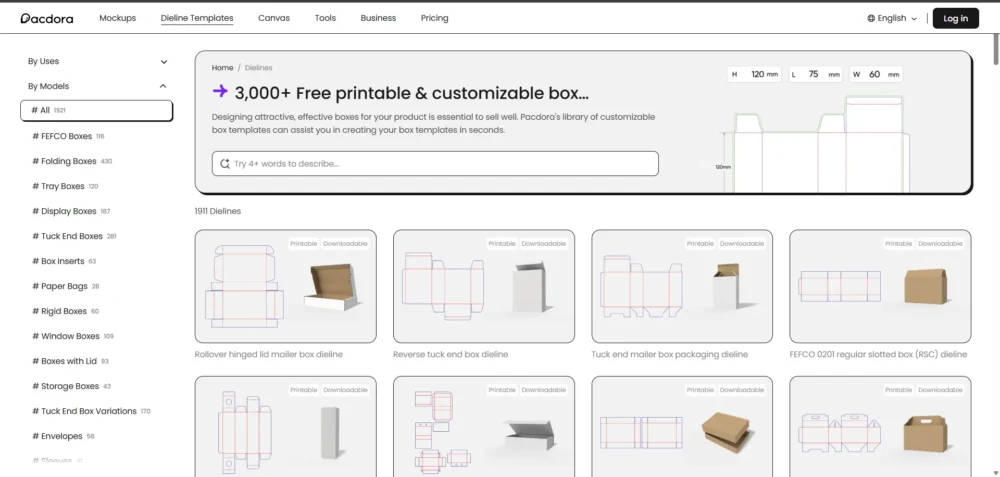
Pacdora’s dieline generator is one of its most useful features for small businesses that need custom packaging without creating a dieline from scratch. Instead of manually drawing cut lines, fold lines, glue areas, and panels, you can choose a packaging structure and customize its dimensions for your product.
Pacdora includes ready-to-use dielines for packaging such as mailer boxes, folding cartons, product sleeves, cosmetic boxes, display boxes, shipping cartons, coffee pouches, bottles, gift boxes, and food containers.
After selecting a structure, you can enter your required dimensions and use the generated dieline as the foundation for your packaging artwork. This can save considerable setup time, especially for small businesses that do not regularly work with structural packaging design software.
However, a generated dieline should not automatically be treated as final production approval. Before placing a large print order, confirm dimensions, material thickness, bleed, folds, glue areas, and other production requirements with your packaging manufacturer or printer.
2. Pacdora 3D Packaging Mockup Generator
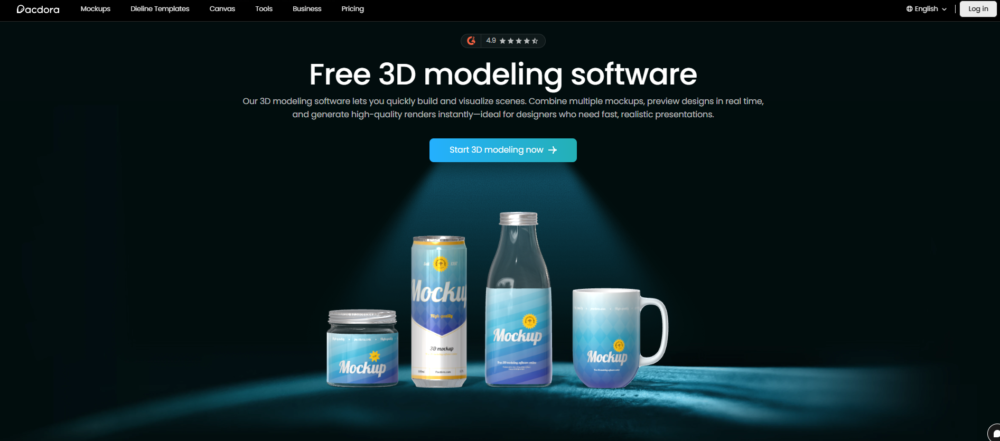
Pacdora’s 3D packaging mockup generator lets you preview a packaging design on a realistic 3D model before sending it to production. Once your artwork is applied to a packaging structure, you can rotate the model and see how the design wraps around different panels instead of judging the packaging from a flat dieline alone.
This is particularly useful for small businesses because it can help reveal visual problems before ordering physical samples. For example, you may notice that a logo looks too small, text sits too close to a fold, or an important design element does not appear where expected once the package is assembled.
Pacdora also provides controls for elements such as:
- Camera angles
- Lighting and shadows
- Backgrounds
- Materials and surface appearance
- Reflections
- Rotation and viewing angles
The resulting mockups can also be useful for presenting packaging concepts, creating product visuals, or comparing different design directions before committing to production.
Keep in mind: A realistic 3D mockup is a visualization tool, not a substitute for a physical packaging prototype or printer proof. Always test important packaging dimensions, folds, materials, and print output before placing a large production order.
3. Pacdora AI Tools for Packaging Design
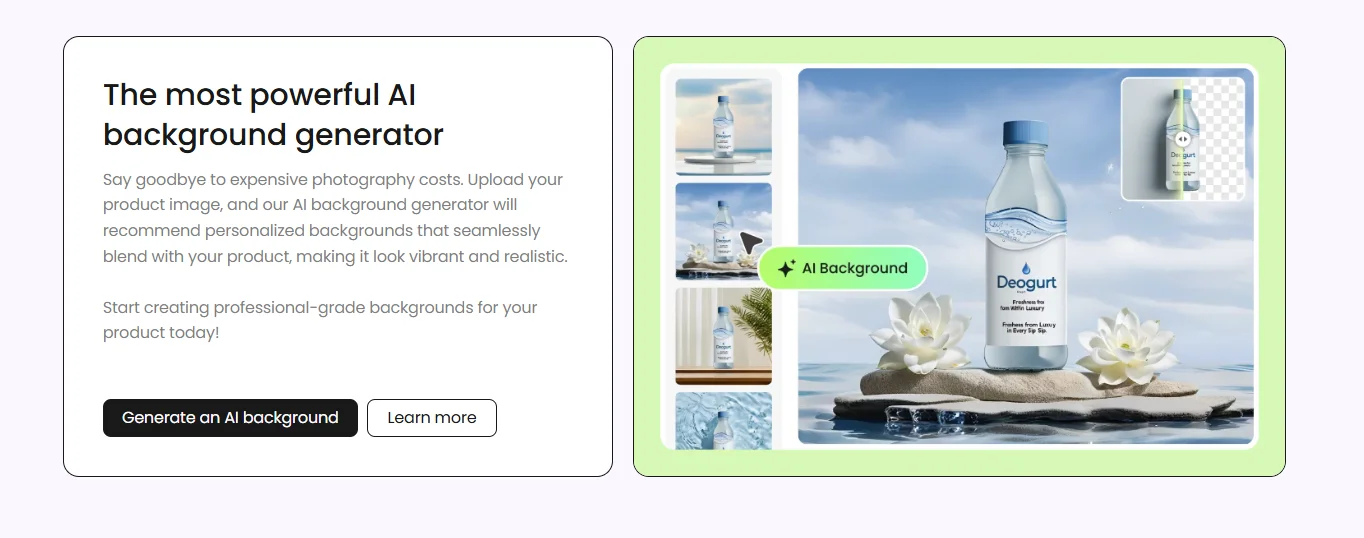
Pacdora includes AI tools designed to speed up packaging concept development and mockup creation. For small businesses, the most useful applications are generating packaging ideas, creating backgrounds and scenes for product mockups, and reducing some of the manual work involved in presenting a packaging concept.
Pacdora’s AI features include:
- AI-assisted packaging design
- AI background generation
- AI scene generation
- AI image editing
- AI material suggestions
- AI-powered visual enhancements
These tools are most valuable during the concept and visualization stage. They can help you explore ideas faster, but they do not replace checking dielines, dimensions, print specifications, or production requirements before manufacturing.
AI Packaging Design
Pacdora can help generate packaging design concepts from prompts, giving small businesses a faster starting point than beginning with a completely blank design. This is most useful for brainstorming visual directions, exploring styles, and developing early packaging concepts rather than producing a final print-ready design automatically.
AI Background Generator
High-quality mockups require realistic backgrounds.
Pacdora’s AI Background feature helps users create attractive product scenes without needing Photoshop skills.
Whether you’re presenting a candle, cosmetic bottle, coffee bag, or shipping box, AI-generated backgrounds can dramatically improve the final presentation.
AI Scene Creation
Instead of placing products on plain white backgrounds, AI can generate realistic environments that better match your brand.
Examples include:
- Coffee shop scenes
- Luxury cosmetic displays
- Kitchen countertops
- Gift packaging setups
- Minimalist studio environments
These scenes are especially useful for eCommerce stores and social media marketing.
Pacdora Packaging Templates
Pacdora offers a large library of customizable packaging templates for businesses that want a faster starting point for packaging design. Templates cover common formats such as shipping boxes, mailer boxes, product boxes, cosmetic packaging, bottles, pouches, coffee bags, food containers, candle packaging, gift boxes, labels, sleeves, and tubes. If you need separate editable dieline downloads, you can also browse Busho Designer packaging templates; these are independent products, not part of Pacdora, and each has its own file and print-sheet requirements. For candle brands working with Adobe Illustrator, see our three-size candle box dieline bundle (AI, PDF, and DXF). These full-size dielines do not fit A4 paper at 100% scale.
Unlike starting from a blank design, these templates provide an existing packaging structure that you can customize with your own dimensions, artwork, colors, and materials. You can then preview the result as a 3D mockup before preparing the design for production.
For small businesses, the main advantage is speed: you can explore professional packaging concepts without building every structure from scratch.
This dramatically reduces design time while maintaining professional results.
How to Use Pacdora for Packaging Design: Step by Step
Pacdora simplifies the packaging design workflow by combining packaging structures, artwork placement, 3D visualization, and export tools in one platform. Here’s a simple workflow for creating packaging in Pacdora.
Step 1 — Choose a Packaging Template
Start by selecting a packaging structure from Pacdora’s template and dieline library. Choose the format that best matches your product—such as a folding carton, mailer box, shipping box, bottle label, coffee pouch, or cosmetic box—then adjust the available dimensions to fit your product.
Step 2 — Upload Your Artwork
Upload your logo, graphics, text, and other brand elements and position them on the packaging dieline. Pay close attention to panel placement, folds, bleed, and safe areas so important design elements are positioned correctly.
Our Graphic Design Basics for Small Business guide is a great place to start.
Step 3 — Preview the Packaging in 3D
Switch to the 3D preview to see how your flat artwork appears on the assembled package. Rotate the model and inspect the front, back, sides, folds, and overall visual balance. This is one of the most useful steps for spotting design issues before creating a physical prototype.
Step 4 — Customize the Presentation
Adjust available materials, finishes, lighting, backgrounds, camera angles, and other visualization settings to create a more realistic representation of the packaging concept.
Step 5 — Generate Marketing Mockups
Once the design looks right, create mockup visuals for presentations, product listings, online stores, social media, or internal design reviews. This allows you to evaluate and present the packaging concept without photographing a finished package.
Step 6 — Export Your Files
Export the files available for your project and plan. Before sending anything to production, confirm the required file format, dimensions, bleed, color settings, material specifications, and other technical requirements with your printer or packaging manufacturer.
Pacdora Pricing
Pacdora currently offers four subscription levels: Free, Lite, Pro, and Business. The right plan depends largely on whether you need Pacdora for basic experimentation, high-resolution mockups, production-ready dieline exports, or commercial business use.
| Plan | Best For |
|---|---|
| Free | Exploring Pacdora and testing its basic packaging and AI tools |
| Lite | Individuals who need higher-quality mockup exports. |
| Pro | Designers and small businesses that regularly create packaging mockups and production files |
| Business | Commercial teams and businesses that need advanced exports, collaboration, and commercial-use rights |
All plans provide access to Pacdora’s large libraries of packaging mockups and dieline templates, but export quality, dieline export capabilities, AI credits, rendering speed, and usage rights vary by plan.
For example, Pacdora currently lists 50 AI credits on Free, 300 per month on Lite, 3,000 per month on Pro, and 10,000 per month on Business. Higher-tier plans also unlock more advanced image and video export options.
Important for small businesses: check Pacdora’s current licensing terms before using generated assets commercially. Pacdora’s pricing page currently distinguishes personal-use permissions on some plans from commercial-use permissions available with Business.
Because Pacdora’s pricing and plan features can change, check the official pricing page for the latest subscription costs and feature limits before upgrading.
Is Pacdora Free?
Yes—Pacdora has a free plan, but not every export or usage right is included.
You can create unlimited projects, upload your artwork, explore packaging templates and mockups, and try AI tools with 50 credits.
The main limits are exports and usage rights. Watermark removal and 2K mockup exports require a paid plan. Free AI-generated images are listed as public, so avoid using confidential launch artwork for these experiments.
Dieline downloads need a closer check: Pacdora’s subscription comparison restricts exports, while some official template pages advertise free downloads, including soap-box templates. Check the specific template’s download options and terms rather than assuming every file is free—or paid.
For a small business, start by testing one packaging concept. Before upgrading, confirm that the selected plan or template permits the export format and commercial use you need.
Check Pacdora’s Current Plans & Pricing
Pros and Cons of Pacdora
Pacdora combines dieline creation, 3D packaging mockups, AI tools, and packaging visualization in one browser-based platform. That makes it particularly useful for small businesses that want to develop and preview packaging without building every part of the workflow from scratch. However, it also has limitations depending on the type of packaging work you do.
| Pros | Cons |
|---|---|
| Large library of packaging mockups and dieline templates | Many useful export features require a paid plan |
| Customizable packaging dimensions and materials | Free plan has significant export limitations |
| Real-time 3D packaging previews | Commercial-use permissions depend on the plan and specific tool/terms |
| No advanced 3D modeling experience required for basic mockups | Not a complete replacement for professional vector design software |
| AI tools for packaging concepts, backgrounds, and mockups | AI features use credits |
| Browser-based workflow with no traditional desktop installation required | Advanced production files should still be checked against printer/manufacturer specifications |
| Can export dielines in formats such as AI, PDF, and DXF on supported plans | May be more functionality than a business needs if it only creates simple labels or graphics |
Pacdora currently provides thousands of mockups and dieline templates, browser-based 3D visualization, AI tools, and—in eligible plans—higher-resolution exports and dieline formats such as AI, PDF, and DXF.
My Take
Is Pacdora legit? Pacdora is a real packaging design platform operated by PACDORA PTE. LTD., according to its published terms. However, that does not mean every template, export option, or plan will fit every small business. Test the workflow you need and check the applicable licensing and export terms before paying.
Is Pacdora safe? Pacdora publishes a privacy policy and terms of use under PACDORA PTE. LTD. and describes how it handles account information and service data. As with any browser-based design platform, review the current privacy, licensing, payment, and export terms before uploading sensitive brand assets or purchasing a plan.
For a small product-based business, Pacdora’s biggest advantage is workflow efficiency. Instead of creating a dieline in one application, building a mockup somewhere else, and using another tool to visualize the finished package, Pacdora brings much of that workflow into one place.
Its biggest limitation is that convenience does not eliminate the need for production checks. Before manufacturing packaging, dimensions, material thickness, bleed, folds, tolerances, and other technical specifications should still be confirmed with the printer or packaging manufacturer.
Overall, Pacdora is strongest for small businesses that need to design and visualize physical packaging—not businesses that only need simple graphics or product labels.
Pacdora vs Canva: Which Is Better for Packaging Design?
Pacdora and Canva can both help small businesses create packaging-related designs, but they are built for different stages of the packaging workflow.
Pacdora focuses on packaging structure, dielines, and realistic 3D visualization, while Canva is primarily a graphic design platform that is especially useful for creating branding, labels, marketing materials, and artwork that can later be applied to packaging.
| Feature | Pacdora | Canva |
|---|---|---|
| Packaging Dielines | Excellent — core feature | Limited |
| Custom Packaging Dimensions | Yes | Limited |
| 3D Packaging Mockups | Excellent | More limited/general-purpose |
| Packaging Structure Design | Strong | Limited |
| AI Design Tools | Yes | Yes |
| Product Labels & Artwork | Good | Excellent |
| Social Media Graphics | Limited | Excellent |
| Marketing Materials | Limited | Excellent |
| Packaging Templates | Structure-focused | Artwork/design-focused |
| Beginner Friendly | Yes | Yes |
| Best For | Dielines, packaging structures & 3D mockups | Branding, labels & graphic design |
When Should You Choose Pacdora?
Choose Pacdora if your main goal is to create or visualize physical packaging, especially if you need:
- Packaging dielines
- Custom box dimensions
- Folding cartons or mailer boxes
- Realistic 3D packaging mockups
- Packaging structure visualization
- A faster way to preview packaging before production
For small product-based businesses, Pacdora is particularly useful when you want to see how a box, pouch, bottle, or other package will look before committing to printing or manufacturing.
When Should You Choose Canva?
Choose Canva if your priority is creating the visual branding and graphics that appear on your packaging, such as:
- Product labels
- Logos and brand graphics
- Stickers
- Inserts and thank-you cards
- Flyers
- Social media graphics
- Simple packaging artwork
Canva is generally easier for everyday graphic design, but it isn’t a substitute for a dedicated packaging structure and dieline workflow.
Pacdora + Canva: Better Together?
For many small businesses, you don’t necessarily have to choose one.
A practical workflow is to create your branding and artwork in Canva, then use Pacdora to apply that artwork to a packaging structure and preview it as a realistic 3D mockup.
This makes Canva useful for the visual design side of packaging and Pacdora useful for the structural and visualization side.
Related Reading: Canva for Packaging Design: The Complete Guide for Small Businesses.
Pacdora vs Adobe Illustrator: Which Is Better for Packaging Design?
Pacdora and Adobe Illustrator can both be used in a packaging design workflow, but they solve different problems.
Pacdora is primarily a packaging-focused platform that simplifies dieline generation, packaging structures, and 3D visualization. Adobe Illustrator is a professional vector design application that gives designers much greater control over artwork, typography, dielines, and print-ready files.
| Feature | Pacdora | Adobe Illustrator |
|---|---|---|
| Learning Curve | Easier | Steeper |
| Browser-Based | Yes | Primarily desktop-based |
| Ready-Made Packaging Dielines | Excellent | Not its primary function |
| Custom Dieline Creation | Simplified | Excellent manual control |
| 3D Packaging Mockups | Built in | More complex workflow |
| Vector Artwork Editing | Limited | Excellent |
| Typography & Branding Control | Good | Excellent |
| AI-Assisted Design Tools | Yes | Yes |
| Print-Ready Artwork | Supported, depending on workflow/plan | Excellent |
| Best For | Fast packaging structures & visualization | Precise professional artwork & production control |
Choose Pacdora if:
- You want to create packaging concepts quickly.
- You don’t have advanced packaging design experience.
- You want ready-made or customizable packaging structures.
- You need realistic 3D packaging previews.
- You want to test packaging ideas before committing to production.
- You prefer a more streamlined packaging-specific workflow.
Choose Adobe Illustrator if:
- You need precise control over vector artwork.
- Your packaging uses complex typography, illustrations, or branding.
- You regularly prepare professional print files.
- You need precise control over bleed, spot colors, dieline layers, and artwork placement.
- You work closely with professional printers or packaging manufacturers.
- You create custom packaging artwork that goes beyond template-based design.
Pacdora + Illustrator: A Stronger Professional Workflow
For many packaging projects, the best solution isn’t necessarily choosing one over the other.
You can use Pacdora to generate or explore packaging structures and create 3D previews, then use Adobe Illustrator for detailed artwork, typography, vector editing, and final print preparation.
For a growing small business, this combination can provide Pacdora’s speed and visualization while retaining Illustrator’s precision and creative control.
Related Reading: Adobe Illustrator for Packaging Design: Complete Guide for Small Businesses.
Best Pacdora Alternatives
Pacdora is a strong option for combining packaging dielines and real-time 3D mockups in one browser-based workflow, but it isn’t the best fit for every project.
The best Pacdora alternative depends on whether you need graphic design, precise vector artwork, structural packaging engineering, quick marketing mockups, or advanced 3D visualization.
| Alternative | Best For | Main Difference from Pacdora |
|---|---|---|
| Canva | Beginners, labels & branding | Better for general graphic design and marketing assets |
| Adobe Illustrator | Professional packaging artwork | Much greater vector, typography, and print-file control |
| Esko ArtiosCAD | Structural packaging engineering | Built for advanced structural and production workflows |
| Boxshot | Product visualization | Focuses heavily on realistic 3D product and packaging renders |
| Blender | Advanced custom 3D work | Far more 3D freedom, but a much steeper learning curve |
| Placeit | Quick marketing mockups | Faster for simple promotional mockups, but not a dieline-focused packaging workflow |
Which Pacdora Alternative Should You Choose?
For most small product-based businesses, I would narrow the choice down based on what you’re actually trying to create:
- Choose Canva if you mainly need labels, branding, inserts, and marketing graphics.
- Choose Adobe Illustrator if you need precise professional packaging artwork and print preparation.
- Consider ArtiosCAD when structural packaging engineering and manufacturing workflows are the priority.
- Consider Boxshot or Blender when sophisticated 3D visualization matters more than Pacdora’s streamlined dieline-to-mockup workflow.
- Consider Placeit when you only need quick marketing visuals rather than production-oriented packaging design.
Is There a Better Alternative to Pacdora for Small Businesses?
Not necessarily.
One of Pacdora’s main advantages is that it combines packaging structures, customizable dielines, artwork placement, and real-time 3D visualization in a relatively accessible workflow. Pacdora currently supports workflows such as converting SVG/DXF dielines into interactive 3D packaging and exporting packaging dielines in formats including PDF, AI, and DXF.
For a small business that regularly works with physical product packaging, that combination can be more convenient than assembling several separate tools.
However, Pacdora is not automatically the best choice if your primary need is graphic design, advanced vector editing, structural engineering, or fully custom 3D modeling
Who Should Use Pacdora?
Pacdora is best suited to small businesses, packaging designers, and product-based brands that need to create, customize, or visualize physical packaging without building the entire workflow from scratch.
It is particularly useful if you regularly work with boxes, pouches, bottles, cartons, or other packaging formats and want to preview the finished design before moving into production.
Pacdora Is a Good Fit For:
- Small product-based businesses creating their own packaging
- Candle and soap brands designing boxes, sleeves, or product packaging
- Cosmetic and skincare brands that need realistic packaging mockups
- Food and coffee businesses testing bags, pouches, boxes, or containers
- Etsy and handmade sellers developing more professional packaging
- E-commerce brands that need packaging visuals for product launches
- Packaging and graphic designers who want a faster dieline and 3D visualization workflow
- Growing brands that want to test packaging concepts before committing to larger print runs
Pacdora May Not Be the Best Fit If:
Pacdora may be unnecessary if you only need simple product labels, social media graphics, or basic marketing materials. Canva or another general graphic design tool may be sufficient for those tasks.
Likewise, businesses that require highly specialized structural packaging engineering or extensive custom vector artwork may still need professional tools such as Adobe Illustrator or dedicated structural packaging software.
Best Fit for Small Businesses
For a small business, Pacdora makes the most sense when you need to move from packaging idea → structure → artwork → 3D preview quickly.
Its value is less about replacing every professional design tool and more about making the packaging development process faster and easier to visualize before production.
Real-World Pacdora Use Cases for Small Businesses
Pacdora becomes especially useful when you need to see how a packaging idea will look before paying for printing or production. Here are a few practical ways small businesses can use it.
Candle Business
A candle brand can choose a folding carton or candle box dieline, adjust it to the product dimensions, add branded artwork, and preview the finished packaging in 3D before ordering printed boxes. This can help catch sizing or design issues before production.
Soap & Handmade Product Business
Handmade brands can create boxes, sleeves, and other packaging concepts for soaps and small products, then compare different materials, colors, and designs before committing to a final version.
Coffee & Food Brand
Coffee businesses can customize stand-up pouches, bags, boxes, and other food packaging formats and generate realistic 3D mockups for product pages, presentations, or packaging approval.
Cosmetic & Skincare Brand
Cosmetic businesses can visualize packaging for bottles, tubes, jars, boxes, and labels. This is particularly useful when comparing different packaging concepts before choosing a final design.
E-commerce & Etsy Sellers
Small online sellers can use Pacdora to create more professional packaging concepts without building every dieline and mockup manually. The 3D previews can also help visualize new products before the physical packaging arrives.
Freelance Packaging Designers
Designers can use Pacdora to turn flat packaging artwork into realistic 3D presentations for clients. This makes it easier for clients to understand how the final package will look before approving the design.
For small businesses, the biggest advantage is simple: Pacdora lets you test and visualize packaging ideas before spending money on physical production.
If Pacdora does not fit your budget or workflow, compare our best Pacdora alternatives, including options for free mockups, custom dielines, 3D visualization, and print-ready packaging artwork.
Frequently Asked Questions About Pacdora
Is Pacdora free?
Yes. See the “Is Pacdora Free?” section above for what you can try, download, and use for your business.
Is Pacdora good for beginners?
Yes. Pacdora is beginner-friendly and does not require advanced packaging design or 3D modeling skills. Its ready-made dielines, templates, and browser-based 3D tools make it especially useful for small business owners who want to create packaging concepts without learning complex professional software.
Can I create packaging without Adobe Illustrator?
Yes. You can create many packaging projects directly in Pacdora without Adobe Illustrator. Pacdora provides ready-made dielines, editing tools, and 3D mockups, while Illustrator is better suited to advanced vector artwork and highly customized professional designs.
Does Pacdora create packaging dielines?
Yes. Pacdora provides customizable packaging dielines for formats such as folding cartons, mailer boxes, shipping boxes, cosmetic packaging, product sleeves, coffee bags, stand-up pouches, and gift boxes. You can adjust dimensions before adding your artwork.
Can Pacdora generate realistic 3D mockups?
Yes. Pacdora can turn packaging designs into interactive 3D mockups that let you preview the package from different angles, adjust materials and lighting, and create realistic visuals before physical production.
Is Pacdora worth it for small businesses?
For many small product-based businesses, yes. Pacdora is especially useful if you regularly need packaging dielines and realistic 3D mockups but do not want to build them manually in multiple design programs.
Is Pacdora better than Canva for packaging design?
Pacdora is generally better for structural packaging design, dielines, and 3D packaging mockups, while Canva is better for general graphic design, social media graphics, and simple label artwork. Many small businesses can use both tools together.
What is the best alternative to Pacdora?
The best Pacdora alternative depends on your needs. Adobe Illustrator is stronger for advanced vector and professional packaging artwork, while Canva is easier for simple graphics and labels. Dedicated 3D packaging tools may be better for more advanced visualization workflows.
Does Pacdora include AI tools?
Yes.
Pacdora continues expanding its AI capabilities with features that assist in generating packaging concepts, creating backgrounds, editing scenes, and improving presentation images.
These tools can speed up the design process, particularly during brainstorming and product visualization.
Can I print directly from Pacdora?
Pacdora prepares packaging files for production, but the actual printing process depends on your chosen print provider.
Most users export their finished designs and submit them to professional packaging manufacturers or commercial printing companies.
Does Pacdora work on Mac?
Yes.
Because Pacdora is browser-based, it works on both Windows and macOS without requiring software installation.
Can I use Pacdora on a Chromebook?
Yes.
Since the platform runs online, Chromebook users can access most features through a modern web browser, provided they have a stable internet connection.
Is Pacdora better than Adobe Illustrator?
Not necessarily.
Adobe Illustrator remains the industry standard for advanced vector illustration and custom packaging artwork.
Pacdora excels in packaging workflows by simplifying tasks such as dielines, 3D visualization, and mockup creation.
For many professionals, the best workflow is to use Illustrator for artwork and Pacdora for packaging presentation.
Is Pacdora worth paying for?
If you regularly create product packaging, the paid plans can save significant time by providing premium templates, faster workflows, higher-quality exports, and additional AI tools.
For occasional users, the free plan is often sufficient to learn the platform and complete simple projects.
Final Verdict: Is Pacdora Worth It in 2026?
Yes—Pacdora is worth considering in 2026, especially for small businesses that need packaging dielines and realistic 3D mockups without a complicated design workflow.
Its biggest advantage is convenience. You can choose a packaging structure, customize dimensions, add artwork, preview the design in 3D, and create presentation-ready mockups within one browser-based platform.
However, Pacdora is not a complete replacement for Adobe Illustrator. Businesses that need advanced vector editing, highly customized artwork, or complex production files may still benefit from Illustrator or professional packaging design software.
Best for: small product-based businesses, Etsy and Shopify sellers, startups, and designers who regularly need packaging mockups and dielines.
Skip it if: your main need is advanced graphic design or you rarely create packaging.
Our verdict: Pacdora is one of the more practical packaging design tools for small businesses that want to move from packaging idea to realistic visualization quickly.