
Learning how to choose a candle box size starts with the actual jar, lid, and any padding you plan to use. A candle’s ounce label is not a reliable substitute for its outside measurements. This guide explains how to check the fit and try Busho Designer’s free 100 × 100 × 120 mm candle box template before preparing a batch.
Get the free candle box template — AI, PDF, and DXF files, available through a $0 guest checkout.
Measure your candle before choosing a box
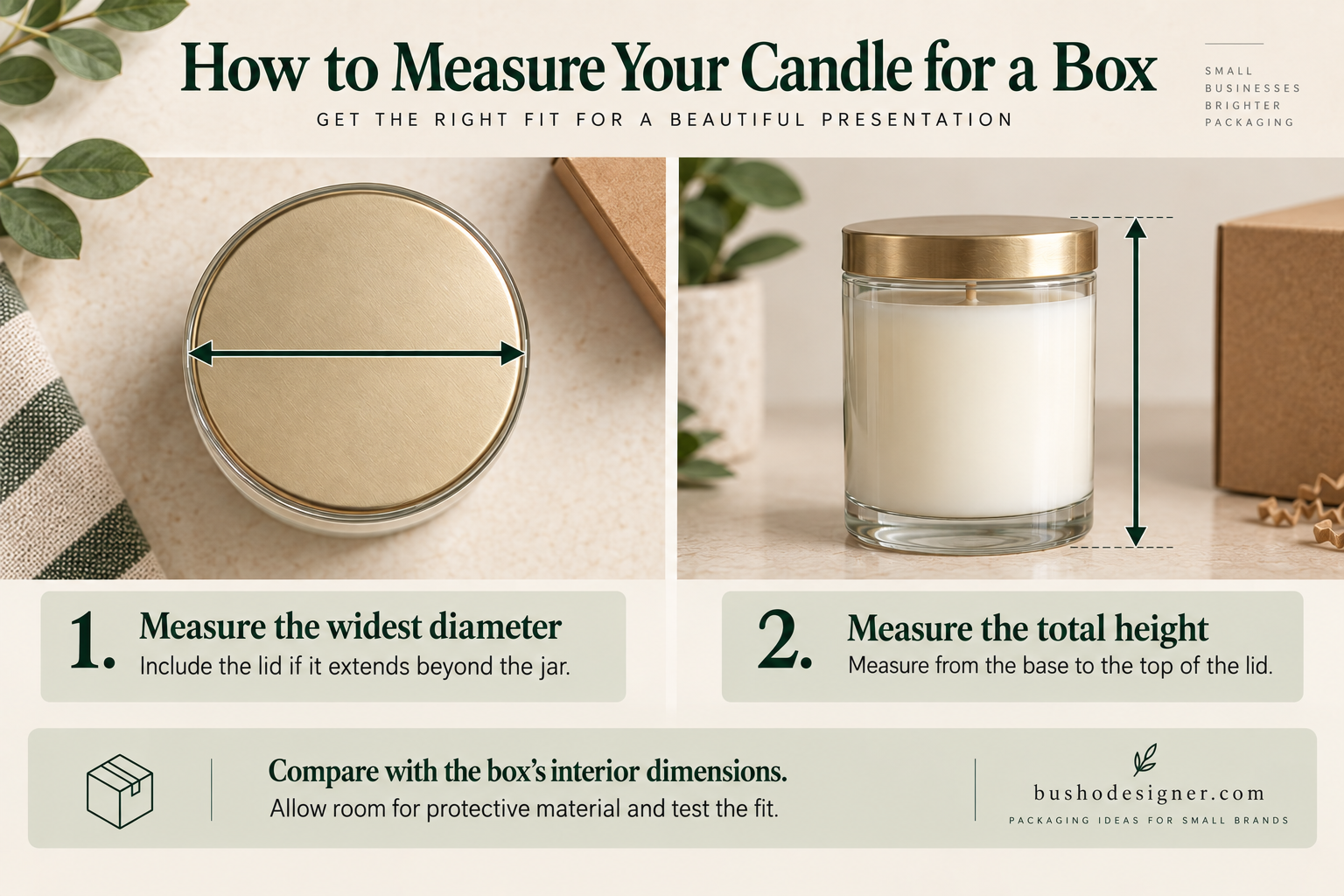
Measure the container at its widest point, including the lid or any projecting details. For a round jar, record the outside diameter. For a square or irregular container, record both length and width. Then measure the total height with the lid in place.
Write down three measurements: outside length, outside width, and total height. Compare these with the finished interior dimensions of the packaging, rather than the flat template dimensions.
Allow room for the protective material you actually intend to use. There is no single clearance that works for every jar and paperboard. A container that is exactly as wide as the stated box interior may be too tight once you assemble your chosen stock. Make a physical sample to check.
How to Choose a Candle Box Size: Compare Three Options
| Template | Finished interior dimensions | Where to start |
|---|---|---|
| Small | 70 × 70 × 90 mm | View the small template |
| Medium | 85 × 85 × 105 mm | View the medium template |
| Large | 100 × 100 × 120 mm | Try the free large template |
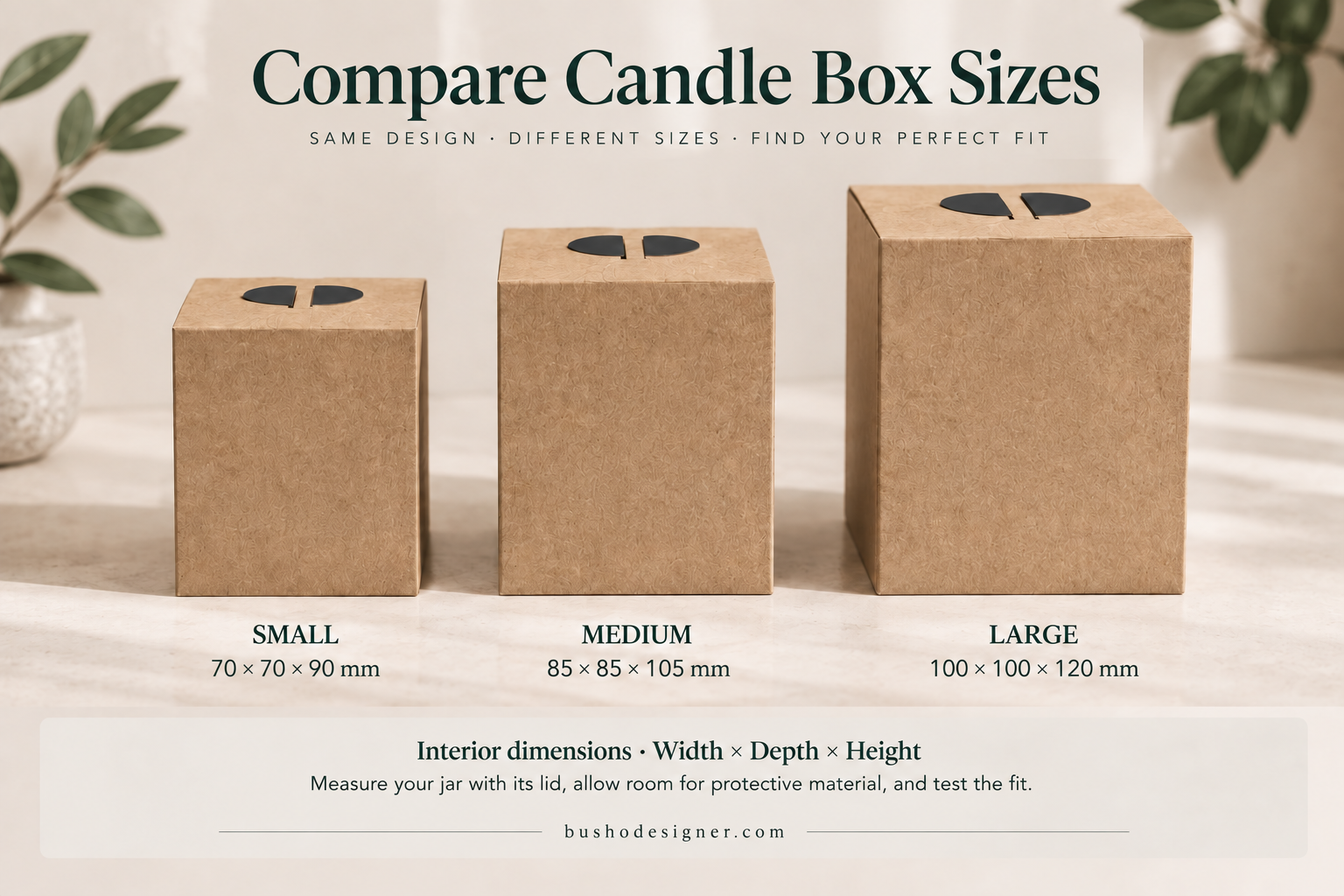
These are size options, not a promise that a particular candle weight will fit. If you need the smaller files too, the candle box template bundle includes all three sizes. The large template is also available separately for free.
Check the print size before downloading
The free large template is a full-size packaging dieline. It does not fit on a single A4 or US Letter sheet at its intended scale.
- Finished interior: 100 × 100 × 120 mm.
- Cut-line boundary: approximately 413 × 503 mm.
- Bleed boundary: approximately 419 × 509 mm.
- Supplied PDF artboard: approximately 512 × 693.83 mm.
The artwork can be placed at 100% on an SRA2 sheet, subject to the printer’s usable area. The supplied PDF artboard is larger than that sheet, so a print provider may need to crop the empty artboard or place the artwork in a new document without scaling it. Ask the printer to confirm the printable area and supported paperboard before ordering.
Do not choose “Fit to Page” to squeeze the template onto smaller paper: that also reduces the finished box and its locking details. Adobe’s Illustrator printing guide explains the difference between printing without scaling and using Fit to Page.
Download and prepare your test sample
- Add the free template to your cart and complete the $0 checkout using a valid email address. An account is not required.
- Download the ZIP from the order page or order email, then extract it. On an iPhone, save it to Files and tap the ZIP to create its folder.
- Open the supplied PDF to review the layout. Use Adobe Illustrator or compatible vector software if you want to edit the AI artwork. This is not a Canva template.
- Confirm the scale and print requirements. If you use the DXF, verify its imported units and dimensions in your cutting software.
- Cut the indicated cut lines, score the crease lines, then fold and engage the locking features. Bleed guides mark artwork beyond the cut edge; they are not additional cut lines.
For artwork preparation, see Adobe Illustrator for packaging design.
What to check before producing more boxes
Place your unlit candle and intended padding inside the assembled sample. Check that the lid closes without force, the locking tabs engage, and the jar can be removed comfortably. Look for bowing panels, strained folds, or excess movement. Repeat the test with the paperboard you intend to use for production.
This retail box is not, by itself, a tested shipping system for a glass candle. For delivery, plan an outer shipping box and suitable cushioning, then test the complete packed parcel. Our candle packaging ideas guide covers additional presentation options.
Frequently asked questions
Does downloading require an account?
No. You can complete the free order as a guest. Use an email address you can access to keep your order and download information.
Can I print this template on a home printer?
Not on a single A4 or US Letter sheet at full size. Check the dieline boundary, printer margins, and supported stock, or use a print provider with a suitable sheet size.
Can I use the packaging for my own brand?
The product listing permits customization and use of the resulting physical packaging for your own brand. It does not permit resale or redistribution of the template files. Review the listing’s license before use.
Next step: Download the free large candle box template, check the print requirements, and build one sample before making a production decision. Once the box fit is confirmed, compare our best printers for candle labels if you also plan to print branded jar labels in-house.