
Affiliate disclosure: This post contains affiliate links. If you purchase through them, I may earn a commission at no extra cost to you. As an Amazon Associate I earn from qualifying purchases.
Scope: This guide compares printers for full-color candle product labels used on jars, tins, and packaging—not direct-thermal 4×6 shipping-label printers. Choosing the right printer depends on matching it to your label format, material, and order volume. For many new candle businesses, a refillable-tank inkjet paired with compatible sheet labels is a flexible place to start. A compact color roll printer suits one-at-a-time labels, while a dedicated color label printer serves a more production-focused workflow.
Quick answer: The Epson EcoTank ET-2980 is our recommended starting point for small candle businesses using compatible full-color sheet labels. The Canon PIXMA G3270 has manufacturer-documented label-printing support, the Epson EcoTank Photo ET-8550 adds a six-color wide-format workflow, the Brother VC-500W prints compact color roll labels, and the Primera LX600 is a dedicated color roll-label option.
For small runs or test batches of custom candle labels, a refillable inkjet with compatible printable label sheets is usually the most flexible starting point because you can print a few sheets at a time without committing to a dedicated roll-label workflow.
Research note: The recommendations are editorial judgments based on current manufacturer specifications and suitability for common candle-label workflows—not hands-on performance rankings. Busho Designer has not hands-on tested these five printers. Confirm that your chosen label stock is compatible with the exact printer and test a finished label on the actual candle container before ordering materials in bulk.
Best Printers for Candle Labels at a Glance
| Printer | Best for | Workflow | Where to buy |
|---|---|---|---|
| Epson EcoTank ET-2980 | Best starter choice | Full-color label sheets | Check ET-2980 price |
| Canon PIXMA G3270 | Simple sheet-label setup | Full-color label sheets | Check G3270 price |
| Epson EcoTank Photo ET-8550 | Premium graphics and larger media | Wide-format label sheets | Check ET-8550 price |
| Brother VC-500W | Small on-demand labels | Compact color rolls | Check VC-500W price |
| Primera LX600 | Growing production workflow | Dedicated color rolls | Check LX600 price |
Recommended starter sheet printer — Epson EcoTank ET-2980: A refillable-tank color inkjet for businesses that want to print several label shapes and sizes from standard sheets.
Documented sheet-label alternative — Canon PIXMA G3270: A wireless refillable-ink printer for sheet-label workflows and everyday business printing.
Wide-format option for design-heavy workflows — Epson EcoTank Photo ET-8550: A wide-format photo-oriented inkjet for detailed artwork, larger sheets, and businesses that also produce branded inserts or prints.
Compact color roll option — Brother VC-500W: A small ZINK printer for on-demand labels in several roll widths without ink cartridges.
Dedicated color roll option — Primera LX600: A dedicated roll-label printer designed for faster, repeatable color-label output.
First, Choose the Right Candle-Label Workflow
A product-label printer and a shipping-label printer solve different problems. Candle labels usually need brand colors, fine text, scent names, and decorative artwork. A direct-thermal printer is efficient for monochrome shipping labels, but it is rarely the right primary tool for a full-color front label. If you need postage and 4×6 labels, compare those separately in our guide to the best thermal printers for small businesses.
Sheet-label inkjet printing
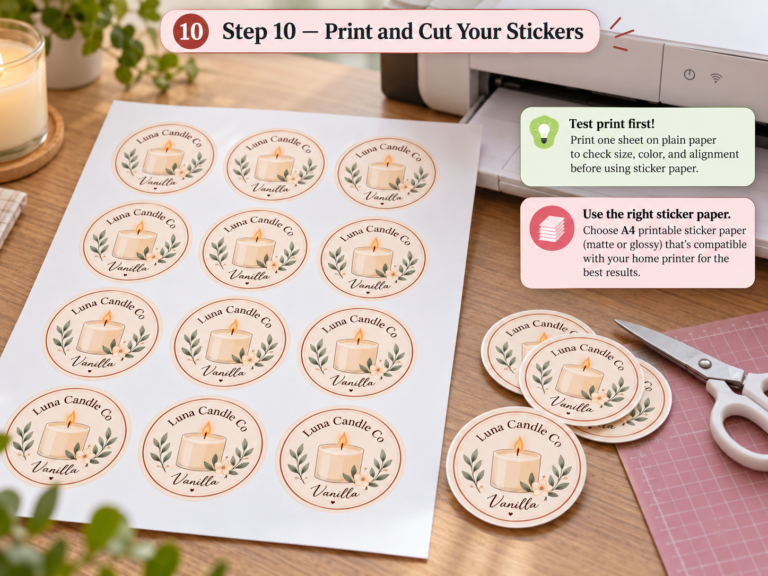
This is the most accessible workflow for many home-based candle businesses. You design several labels on a letter-size sheet, print them through a color inkjet printer, and peel each label from the sheet. It gives you a broad choice of circles, rectangles, arches, and custom-looking shapes without committing to a roll system. It also makes short scent runs and seasonal collections easier.
Compact color roll printing
A compact roll printer prints one label at a time and reduces the setup involved in laying out a full sheet. The tradeoff is that you are limited to the manufacturer’s compatible rolls, widths, and finishing options. This format is useful for changing scent names frequently, printing small batches, or working in a tight space.
Dedicated roll-label production
A dedicated color label printer is built around roll media and a repeatable production process. It can be a better fit when label printing has become a bottleneck, but the printer, media, ink system, maintenance, and finishing workflow all need to be evaluated together. Do not choose one based on print speed alone.
1. Epson EcoTank ET-2980 — Recommended Starter Sheet Printer
The Epson EcoTank ET-2980 is a refillable-tank color inkjet with wireless connectivity and a 100-sheet paper tray. Epson lists print, copy, and scan functions, along with mobile printing support. For a candle business, its practical advantage is workflow flexibility: after confirming media compatibility, it can be used with inkjet-compatible product-label sheets as well as care cards, packing inserts, and ordinary documents.
Why it fits candle labels: Standard sheet feeding lets you choose label stock by finish, adhesive, shape, and sheet layout, as long as the media is explicitly compatible with inkjet printers. The refillable tanks use ink bottles rather than conventional small cartridges; actual ink usage depends on the artwork, media, and print settings.
Limitations: It is still a general-purpose sheet-fed printer. Feeding very thick, curled, glossy, or specialty label sheets can require testing, and no inkjet printer automatically makes a paper label water-, oil-, or heat-resistant. Print one sheet first, allow the ink to dry fully, and check alignment before running a batch.
Best suited to: New or growing candle businesses that want flexible full-color labels and use several sheet-label formats.
2. Canon PIXMA G3270 — Documented Sheet-Label Alternative
The Canon PIXMA G3270 is a wireless MegaTank all-in-one color printer. Canon explicitly lists label printing among its print features, along with document and photo printing, and specifies a rear paper tray. That gives it a manufacturer-documented sheet-label use case, although third-party label stock still requires compatibility and alignment testing.
Why it fits candle labels: The refillable-ink design supports repeated color printing without proprietary label rolls, and the rear-tray sheet workflow allows a candle business to compare compatible label shapes and materials in small quantities.
Limitations: Media compatibility and feed reliability matter more than the brand name on the printer. Specialty coatings can behave differently, so confirm the paper maker’s printer guidance and start with small packs. If exact color matching is critical, plan for test prints because screen color and printed color will not be identical.
Best suited to: Candle makers who want a simple color sheet-label setup and prefer Canon’s ecosystem.
3. Epson EcoTank Photo ET-8550 — Wide-Format Option
The Epson EcoTank Photo ET-8550 is a wide-format, photo-oriented wireless all-in-one. Epson specifies a six-color ink system, borderless media up to 13 × 19 inches, and support for cardstock and other specialty media up to 1.3 mm thick. Those features may suit a visually led candle brand that also produces coordinated inserts or larger printed pieces.
Why it fits candle labels: Its six-color photo-oriented system and wider media handling make it the clearest fit in this comparison for packaging built around illustration, photography, gradients, or detailed artwork. Label-stock compatibility still needs to be confirmed separately.
Limitations: This is more printer than many early-stage sellers need. Photo-oriented hardware does not replace good label files, compatible media, accurate trimming, or testing on the finished container. If your labels are mostly text and a simple logo, the added capability may not improve the customer experience enough to justify the more complex setup.
Best suited to: Design-focused candle brands producing premium graphics, coordinated inserts, and larger printed pieces in-house.
4. Brother VC-500W — Compact Color Roll Option
The Brother VC-500W uses ZINK Zero Ink technology rather than conventional ink cartridges. Brother lists five compatible roll widths, Wi-Fi connectivity, desktop and mobile design options, and labels up to 17 inches long in a single pass.
Why it fits candle labels: The compact roll workflow is convenient when you print labels in small quantities, change scent names often, or do not want to arrange a full sheet. It can also be useful for color-coded inventory, warning information, sample tins, and short seasonal runs.
Limitations: You are buying into a specific roll system. Check the available widths, adhesive, surface finish, the roll material’s stated resistance properties, and cost per label before deciding. It is not a substitute for a wide choice of pre-cut sheet shapes, and the visual finish may not suit every premium candle brand.
Best suited to: Small workspaces and low-volume, on-demand color labels where speed of setup matters more than media variety.
5. Primera LX600 — Dedicated Color Roll Option
The Primera LX600 is a dedicated color roll-label printer. Primera lists a maximum print width of 5 inches, print speeds up to 4.5 inches per second, dye or pigment ink cartridge options, an integrated cutter, and production of up to 3,000 labels per day.
Why it fits candle labels: A dedicated printer can make sense when changing sheet layouts, peeling from sheets, or waiting for general-purpose printing slows fulfillment. Roll media also supports a more repeatable sequence from design to print to application.
Limitations: Manufacturer output figures are not a promise of your real-world throughput. Label size, artwork coverage, print-quality settings, maintenance, media changes, drying, and application all affect production. Before buying, calculate the total workflow cost and request compatible media samples for your jars or tins.
Best suited to: Established candle businesses that print labels frequently enough to justify a dedicated roll-label workflow.
How to Choose a Printer for Candle Labels
Match the printer to the label material
Start with the material, not the printer. Paper labels can work for dry, indoor applications, while film-based or coated stocks may be better where condensation, oils, fragrance residue, or handling are concerns. “Waterproof” is a system-level claim: the face stock, coating, adhesive, ink, and optional laminate all contribute. A printer specification alone cannot guarantee a waterproof finished label.
When comparing materials, use our guide to the best printable sticker paper as a starting point, then verify the paper manufacturer’s compatibility instructions. Laser-only stock should not go through an inkjet printer, and inkjet-only stock should not be assumed safe or effective in a laser device.
Measure the container before choosing a format
Measure the usable flat area of the jar, tin, lid, or dust cover. A label that crosses a strong curve can wrinkle or lift. Leave enough room for required product information and make sure the type remains readable at actual size. Print a plain-paper draft, trim it, and tape it to the container before ordering label stock.
Separate front labels from safety and shipping labels
A candle order can involve several labels: a decorative front label, a bottom safety label, a scent or batch label, and a shipping label. One printer can sometimes cover the product labels, but a separate monochrome thermal printer may be more efficient for postage. For logo stickers, thank-you seals, and other packaging projects beyond candles, compare our printers for color stickers and product labels. For broader device comparisons, see our guide to the best label makers for small business.
Consider batch size and variation
Sheet labels are efficient when several designs share the same shape and you can fill a sheet. A one-at-a-time roll printer is convenient when every order or scent needs different information. Dedicated roll printing becomes more attractive when printing itself delays packing. Choose based on your normal week, not your busiest holiday weekend.
Plan the design-to-print workflow
Your artwork must have the correct dimensions, margins, color choices, and export settings before the printer can produce a clean label. Canva can be practical for simple layouts; our Canva packaging design guide explains where it fits. For precise vector artwork and production files, read our guide to Adobe Illustrator for packaging design.
Which Printer Fits Your Candle Business Stage?
Testing a new candle line: Use a refillable-tank sheet printer such as the Epson ET-2980 or Canon G3270. Buy a small quantity of compatible labels, confirm alignment, and test them on finished containers.
Running frequent micro-batches: Consider the Brother VC-500W if its available roll widths and finish match your brand. Its main advantage is printing one changing label at a time without loading a full sheet.
Building a design-led visual brand: Consider the Epson ET-8550 when detailed graphics and additional branded print pieces are central to the business. Do not pay for photo-oriented capability if your label design is intentionally simple.
Removing a production bottleneck: Evaluate a dedicated printer such as the Primera LX600 only after you understand monthly label volume, media availability, maintenance, and total cost per finished label.
Candle-Label Pre-Purchase Checklist
Print technology: Confirm whether the label stock is made for inkjet, laser, ZINK, or the specific dedicated printer.
Adhesive: Test adhesion on the exact container surface, including coated tins, glass, frosted glass, and curved areas.
Durability: Expose a finished sample to normal handling, light moisture, fragrance oil residue, and the temperatures it may encounter during storage or shipping. Keep labels away from flame and follow applicable candle-labeling requirements.
Legibility: Print warning text, net weight, scent information, and business details at actual size. Do not rely on a zoomed-in screen preview.
Color consistency: Save a reference sample from an approved batch and compare future runs under the same lighting.
Workflow cost: Include label media, ink or proprietary rolls, rejected prints, cleaning, trimming, and staff time—not only the printer purchase.
Labels are only one part of presentation and protection. Coordinate them with your candle packaging supplies so the jar, label, box, filler, and insert feel like one system. For a box-size trial, download our free 100 × 100 × 120 mm candle box dieline and check its print-size requirements before assembling a sample. If you are packaging the jar in a folding carton, use this guide to choose the right candle box size before ordering or printing boxes.
Frequently Asked Questions
What is the best printer for candle labels at home?
For many home-based candle businesses, a refillable-tank color inkjet and compatible sheet labels provide a flexible, manageable starting workflow. The Epson EcoTank ET-2980 is our overall starter pick, with the Canon PIXMA G3270 as a strong alternative. Once you choose a printer, follow our home candle-label printing guide for paper, scaling, quality settings, and alignment tests.
Can a thermal printer print candle labels?
A direct-thermal printer can print monochrome text, barcodes, safety labels, or shipping labels on compatible thermal media. It is usually not the right choice for a full-color branded candle label. Color thermal-transfer systems exist, but they are a different category from the common 4×6 shipping printer.
Do I need a special printer for waterproof candle labels?
You need a compatible printing system, not just a printer marketed for labels. The label material, coating, adhesive, ink, and laminate determine how the finished label handles moisture and oils. Ask the label supplier whether the stock is compatible with your exact printer type and test it on the final container.
Is inkjet or laser better for candle labels?
Inkjet offers a broad selection of small-business color printers and printable label stocks, making it a practical starting point. Laser can provide fast, dry output on laser-compatible materials, but heat and feed-path requirements limit some specialty stocks. Choose the media first, then select the printer technology it supports.
Can I print candle labels from Canva?
Yes, provided the design uses the correct dimensions and the exported file aligns with your label template. Print at 100% or actual size, disable automatic scaling when required by the template supplier, and run one test sheet before a batch.
When should I outsource candle labels instead?
Outsourcing may be better when you need specialty finishes, exact color control, custom die-cut shapes, film with verified resistance properties, or a volume that makes in-house printing and application inefficient. Compare the delivered cost per usable label with your true in-house cost, including waste and labor.
Related Candle Label Guides
Once you choose a printer, use our step-by-step guide to printing candle labels at home to set up paper, print settings, and test runs. If you also need the packaging itself, see how to choose the right candle box size.
Final Verdict
Our recommended starting point is the Epson EcoTank ET-2980 because its refillable tanks, 100-sheet tray, wireless features, and general-purpose functions fit a flexible small-business workflow. Epson does not guarantee compatibility with every third-party label sheet, so test media first. Choose the Canon PIXMA G3270 when documented label-printing support and a rear tray are priorities, the Epson ET-8550 for a six-color wide-format workflow, or the Brother VC-500W for compact on-demand roll labels. Consider the Primera LX600 when repeated roll-label production—not occasional sheet printing—is the problem you need to solve.
Whichever route you choose, order a small amount of compatible media first and test the complete label on your candle container. The right printer is the one that produces a readable, brand-appropriate label that meets your tested adhesion and resistance requirements within your actual packing workflow.