
Affiliate disclosure: This article contains Amazon affiliate links. If you buy through them, I may earn a commission at no extra cost to you. As an Amazon Associate I earn from qualifying purchases.
Need a sticker printer for a small business making colorful logo stickers, product seals, or branded packaging inserts? The best printer for stickers depends on whether you print full sheets, need richer artwork, or produce finished labels from rolls. This guide compares five practical options for small product-based businesses. It focuses on color stickers and product labels—not 4 × 6-inch shipping labels. If you still need to design the artwork, start with our step-by-step Adobe Illustrator sticker tutorial before choosing your printer.
Quick answer: Which sticker printer should you choose?
For a new shop printing occasional letter-size sticker sheets, start by looking at the Canon PIXMA TS7720. If you print sheets regularly, the Epson EcoTank ET-2980 offers refillable tanks. Choose the Canon PIXMA G620 when colorful artwork matters most, the Epson EcoTank Photo ET-8550 when you need wide-format sheets and specialty media, or the Primera LX600 for a dedicated roll-label workflow.
How we selected these picks: We compared manufacturer-published media sizes, feeding method, ink system, and the practical job each printer can perform for a small packaging business. We did not run side-by-side print tests, measure actual ink consumption, or test a specific third-party sticker stock. The category labels below describe the intended workflow, not a measured performance ranking. Always check the exact paper and printer combination before a larger purchase.
| Printer | Best use | Feed format | Main trade-off |
|---|---|---|---|
| Canon PIXMA TS7720 | Occasional branded sticker sheets | Letter/A4 sheets | Cartridge costs rise with volume |
| Epson EcoTank ET-2980 | Frequent small-business sheet printing | Letter/A4 sheets | Confirm specialty-stock compatibility |
| Canon PIXMA G620 | Colorful artwork and photo-style stickers | Letter/A4 sheets | Photo focus; test small lettering |
| Epson EcoTank Photo ET-8550 | Large sticker sheets and thicker projects | Up to 13 × 19 in. | Higher upfront investment |
| Primera LX600 | Finished color labels on rolls | Pre-cut/continuous rolls | Requires compatible roll stock |
Canon PIXMA TS7720
Best for: a small business making short runs of logo stickers, thank-you seals, and packaging labels on printable sheets.
Canon lists a rear tray that accepts Letter and A4 media as well as smaller photo sizes. Its ordinary sheet workflow makes it a flexible starting point if you also print cards or everyday documents.
Before you buy: It uses replaceable ink cartridges. Check the sticker-paper manufacturer’s inkjet compatibility and test a few sheets before printing a full batch; Canon’s supported paper list does not approve every third-party adhesive material.
View Canon PIXMA TS7720 on Amazon · Manufacturer specifications
Epson EcoTank ET-2980
Best for: a shop that prints branded sticker sheets frequently and wants refillable ink tanks.
Epson specifies a four-color EcoTank system, a 100-sheet tray, scanner, and Letter/A4-size media support. It is a sensible everyday choice for text-and-logo stickers on compatible inkjet sheets.
Before you buy: Its published document page yields are not a cost-per-sticker promise: saturated full-color graphics can use much more ink. Confirm the thickness and coating of your chosen sheet stock with Epson’s paper requirements.
View Epson EcoTank ET-2980 on Amazon · Manufacturer specifications
Canon PIXMA G620
Best for: brands whose sticker artwork includes photographs, gradients, or subtle colors.
Canon’s six dye-based inks include red and gray, and Canon lists label printing among the machine’s features. Its refillable tanks make it attractive for recurring artwork-heavy sheets.
Before you buy: Dye ink and uncoated sticker paper are not automatically waterproof. Test fine print, drying time, and water exposure with the exact material you plan to sell or apply.
View Canon PIXMA G620 on Amazon · Manufacturer specifications
Epson EcoTank Photo ET-8550
Best for: makers who also need wide-format artwork, larger sticker sheets, or selected cardstock projects.
Epson lists borderless prints up to 13 × 19 inches and a rear feed slot for certain thick specialty media. That range can support stickers alongside packaging prototypes and inserts.
Before you buy: The specialty rear feed handles one sheet at a time, and accepted thickness does not guarantee adhesive-sheet compatibility. Buy it for the larger creative workflow, not just a few small labels.
View Epson EcoTank Photo ET-8550 on Amazon · Manufacturer specifications
Primera LX600
Best for: a product business that wants finished, full-color labels fed from rolls rather than cutting stickers from sheets.
Primera lists roll-fed pressure-sensitive labels and interchangeable dye or pigment CMY cartridges. A dedicated roll system can suit repeated product-label runs with a consistent shape.
Before you buy: This is a different workflow from home inkjet sticker sheets. Budget for approved roll materials and cartridges, and check the exact finished-label size and per-label costs before ordering.
View Primera LX600 on Amazon · Manufacturer specifications
Sheet printer or roll-label printer?
Choose a sheet-fed inkjet when you want to print several sticker shapes on Letter or A4 sheets, cut them by hand, or use a separate cutting machine. Choose a color roll-label printer when you repeatedly print one product-label size on compatible pre-cut stock. A standard direct-thermal shipping printer generally makes monochrome shipping and barcode labels; it does not substitute for a full-color product-sticker printer. For shipping equipment, see our thermal printer comparison.
How to pick the right sticker paper
- Match the technology: Inkjet printable sheets for inkjet models. Do not assume laser sheets, thermal rolls, and inkjet stock are interchangeable.
- Check the feed path: Try one sheet of the material first and keep its backing flat to reduce jams.
- Match the finish to use: Matte can make small text easier to read; glossy can enhance color. Test adhesive strength on the actual package.
- Test durability: For products exposed to water, oil, rubbing, or sunlight, test the combined ink, coating, and label material. “Water-resistant” is not the same as waterproof.
- Measure the true cost: Divide ink and media expenses by the number of usable stickers per sheet or roll, including waste from misalignment.
For material recommendations and a comparison of finishes, read our printable sticker paper guide. If you also make candles, see the more specialized candle-label printer guide. If your priority is barcodes, inventory, packaging, or shipping rather than full-color stickers, compare our best label makers for small business.
How to print a test sticker sheet
- Set the design to the physical sheet size in your design app, leaving a margin unless your printer supports that paper and size borderlessly.
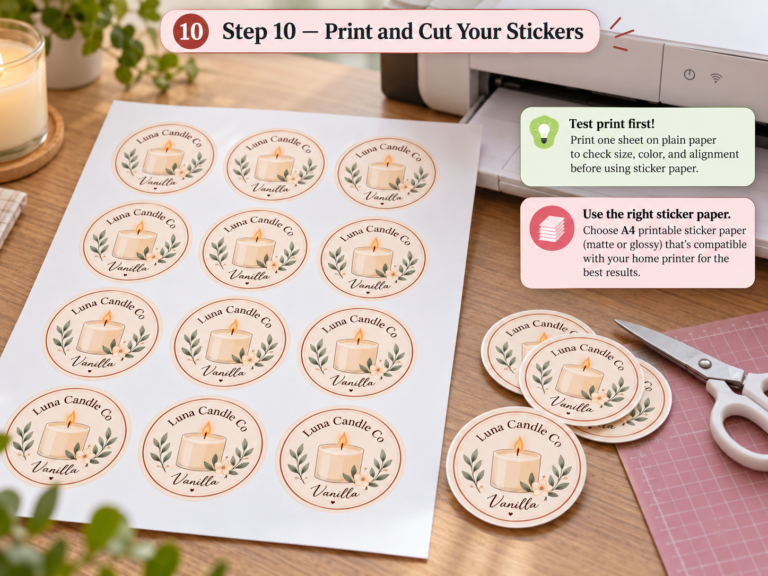
- Print a plain-paper alignment proof at 100% scale with “fit to page” disabled.
- Load one compatible sticker sheet in the correct direction; choose the closest manufacturer-supported media setting.
- Let ink dry, then check small text, color, cutting alignment, and whether the adhesive stays on your real packaging.
- Record settings and the number of usable stickers before ordering a large pack of stock.
If you create artwork in Canva, our Canva packaging guide covers the design workflow. Confirm the physical print dimensions after export. For a complete Canva-to-printer workflow with illustrated steps and free practice sheets, use our step-by-step guide to printing product labels at home. For a worked product-label example covering paper, scaling, and alignment, follow our guide to printing candle labels at home.
Best Sticker Printer for a Small Business: What to Prioritize
For a small sticker business, prioritize print quality, compatible sticker media, ink cost, maximum paper size, and how many sheets or labels you expect to produce each week. An A4 or letter-size inkjet is usually the most flexible choice for full-color sticker sheets, while a dedicated roll printer is better when you need repeated labels in a production workflow.
If your stickers are mainly product labels rather than decorative sticker sheets, compare our best product label printers for small business. For choosing the media itself, see our guide to the best printable sticker paper.
Frequently asked questions
Can a regular inkjet printer print stickers?
Often yes, using printable sheets intended for that inkjet printer and within its media specifications. Print one sheet first; the printer manufacturer may not guarantee every third-party adhesive paper.
Do I need a cutting machine?
No. You can use pre-cut label sheets or cut simple shapes by hand. A separate cutter becomes useful when you make many custom outlines; the five printers above do not replace a dedicated contour-cutting workflow.
Which printer makes waterproof stickers?
No printer alone guarantees a waterproof sticker. Durability depends on the ink, label stock, coating or lamination, and how the sticker is used. Test the finished sticker with water and rubbing before making a claim to customers.
Are these the same as thermal shipping-label printers?
No. This list is for full-color stickers and product labels. A typical direct-thermal 4 × 6-inch printer is intended for monochrome shipping labels.
What is the best sticker printer for a small business?
For frequent full-color sticker sheets, the Epson EcoTank ET-2980 is a practical starting point because its refillable ink system suits recurring small-business printing. For occasional batches, the Canon PIXMA TS7720 is a simpler entry point, while the Primera LX600 fits businesses that need finished color labels from rolls.
Can these printers print vinyl stickers?
They can print on compatible printable vinyl made for the exact printer technology, but vinyl compatibility is not automatic. Check whether the material is rated for inkjet or laser printing, confirm the printer supports its thickness, and test drying, adhesion, water exposure, and rubbing before using the finished stickers on products.
If stickers are only one part of your packaging workflow, compare our broader product label printer guide, our soap label printer guide, and our small business packaging tools before choosing equipment.
Our editorial pick
For frequent Letter-size sticker sheets, start your comparison with the Epson EcoTank ET-2980. For occasional batches, compare the Canon PIXMA TS7720. Choose the Canon G620 for color-first artwork, the ET-8550 for wider creative work, and the LX600 when roll labels fit your production process. Before paying, verify the printer, ink, and exact label stock together. Featured photo by Sticker it on Unsplash.